

SkinTone Craft PowerGrade
The ultimate tool to achieve clean, polished, glowing skintones. For creators who care about details.
This PowerGrade gives you a modular skin tone refinement pipeline
13 professional nodes - Pre-built and ready to use
Texture to tone control - From softening and glow to hue compression and pop
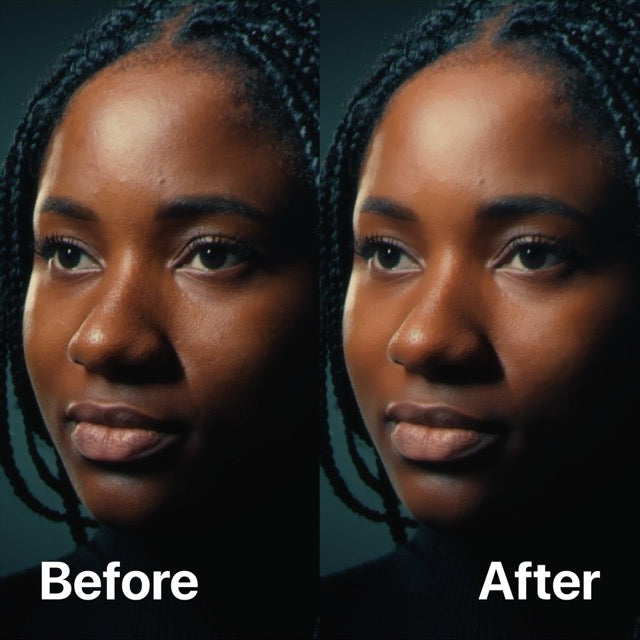
Works on all complexion - Refines skin tones across all types and shades
Advanced node control - Built with Resolve Studio tools for smooth tone refinement
User Guide & Video tutorial included - Fast Setup & Best Practices
Refine. Control. Perfect.
No LUTs, no baked styles. Just the final polish your footage needs, after the look is done.
✅ Universal Compatibility
Compatible with footage from any camera, and fully optimized for iPhone Apple Log
✅ Skin-Focused Node Structure
Everything targets only the skin, no look shifting
✅ Flexible Controls
Adjust every node or bypass what you don’t need
✅ Instantly improves skin tone quality
Applies a natural glow and balance right out of the box — no complex setup required
✅ Built for Resolve ( Studio version only )
Designed by colorists, takes advantage of some of the best refinement tools of DaVinci Resolve Studio
Achieve next-level skin tone control.
Grab the SkinTone Craft PowerGrade now.
Watch the SkinTone Craft PowerGrade in action!

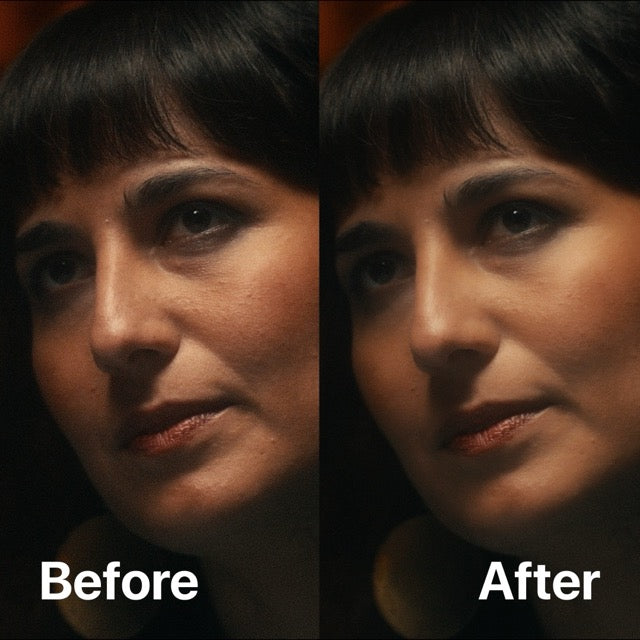
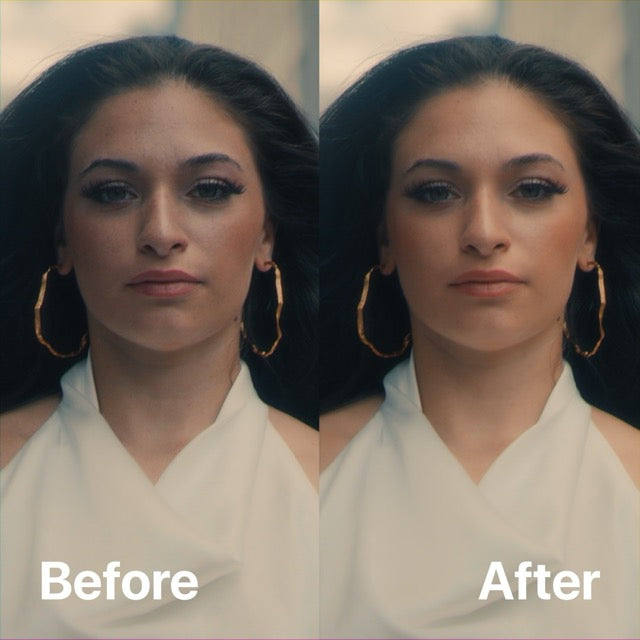
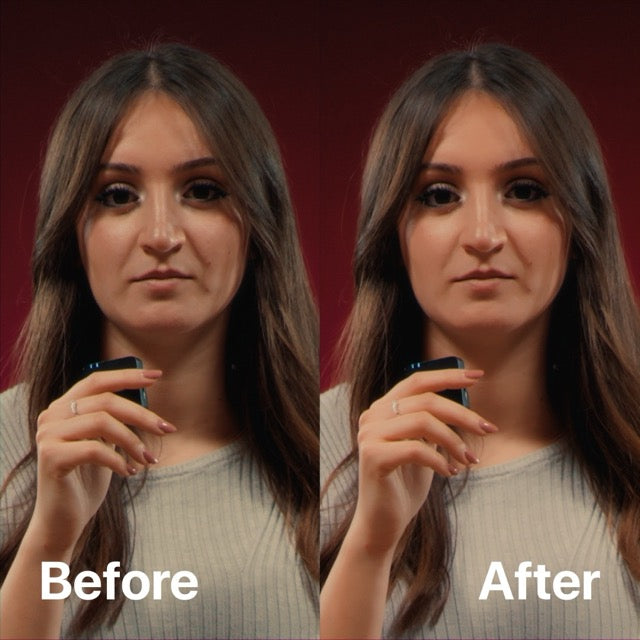
Designed to refine and perfect skin tones in any footage

Before

After
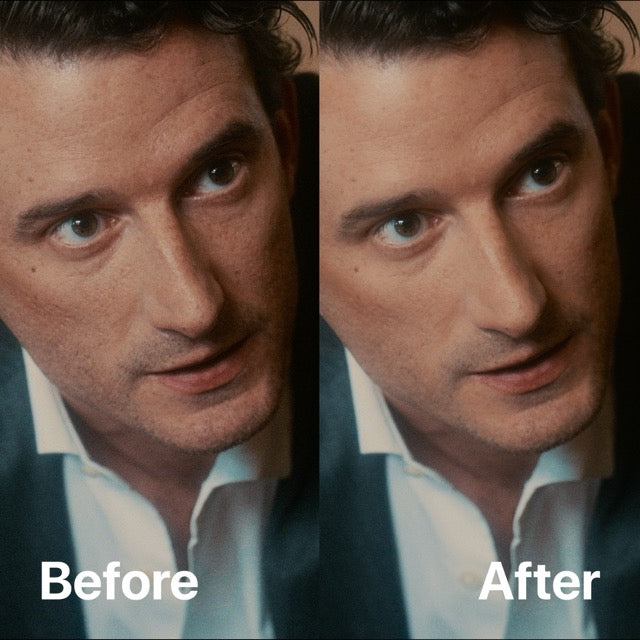
From harsh to harmonized. Easily

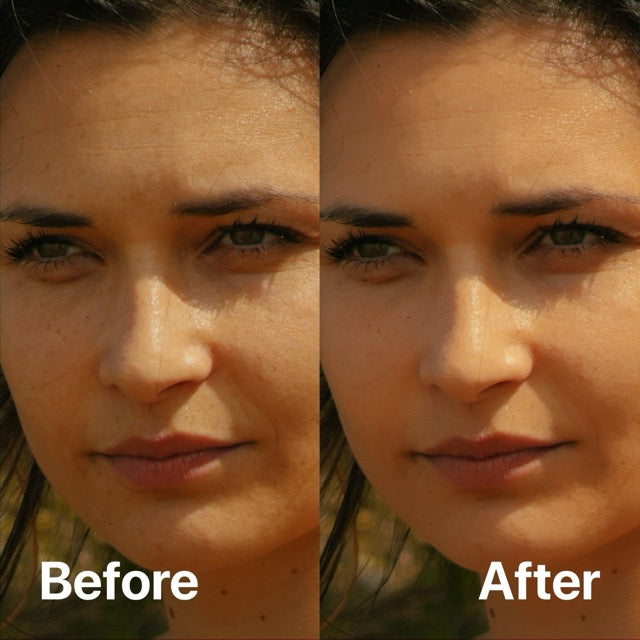
Before

After
fine control over hue, texture, contrast, and glow across all skin tones

Before

After
Node Tree Overview
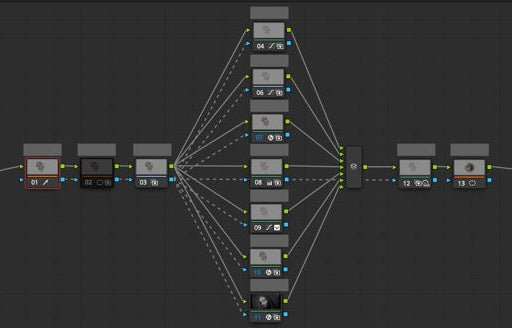
Skin Isolation
Selectively isolates skin areas to ensure all refinements target only what matters, leaving the rest of the image untouched.
Tone Refinement
Balances and restores skin color by reducing unnatural hues and enhancing clarity across all complexion types.
Softening & Texture Control
Applies a smoothing pass that reduces harshness and over-sharpening while maintaining a natural skin finish.
Glow Enhancement
Introduces a subtle luminous lift that gives life to highlights and helps the skin appear more vibrant and dimensional.
Color Harmony
Evens out tonal inconsistencies in the skin, creating smoother transitions and a unified color response across the face.
Detail Reinforcement
Recovers fine texture and skin structure, avoiding overly plastic results and ensuring a realistic surface feel.
Shine & Exposure Check
Tames excessive shine and helps verify exposure and tonal balance before rendering, so skin looks its best in any lighting.
Top-Selling Bundles


FAQ
What is a PowerGrade?
A PowerGrade is a set of preset nodes that define a particular color correction or effect. These nodes encompass all image modifications, from color adjustments to blur effects, ensuring comprehensive editing capability.
What sets PowerGrades apart is their customisable and non-destructive design. Every element, including individual node settings, can be tailored to suit the project's requirements perfectly.
What will I receive?
Immediately after your purchase, you can download your product(s) from the checkout page or via the download link sent automatically to your e-mail within a few seconds.
Inside the folder you’ll find a .dpx and .drx file ( the actual PowerGrade ) a super detailed user guide and a PDF with a link to a video tutorial on how to use the SkinTone Craft PowerGrade.
Can I use this PowerGrade with other softwares?
Unfortunately not, PowerGrade are exclusively built for DaVinci Resolve only. You will need the DaVinci Resolve Studio ( paid version ) to use this PowerGrade.
Do I need any third-party plugins?
No. The effects used in this PowerGrade are native DaVinci Resolve OFX plugins so you do not need to install any third party plugins. Note that you'll need the DaVinci Resolve Studio version in order to use the PowerGrade
Should I Pre-Color My Footage before applying the Apple Log to Red PowerGrade?
Yes, absolutely. This PowerGrade doesn’t include any color space conversion or exposure/contrast/color adjustments as it’s only intended as a finishing tool.
You should apply this PowerGrade at the end of your node tree, after you’ve made all your primary and secondary corrections.
Will I get a refund?
Because all our products are digital downloads, we have no way of taking back the files once you purchase them. For that reason, we can not issue refunds.
If by mistake you purchase multiple quantity of our products, no refunds will be made. If you have any questions or concerns about your purchase, please don't hesitate to reach out to us via the contact page.
My download has expired, do I have to repurchase the pack?
We only renew the download link within 30 days from the date of purchase.
If your download link has expired and it has been more than 30 days then you have to repurchase the pack.
Disclaimer
It is important to note that this is not a one-click solution; merely applying it is not enough. It is necessary to modify the various nodes and settings individually to adapt it to the specific type of video material.
The default settings represent the starting point and serve as a guide to understand the functioning and effect of each specific node.
