
Creative techniques for lighting, camera movement, performance, and color grading
You do not need an expensive cinema camera or a large production crew to create a cinematic music video. With an iPhone, a strong visual concept, and a few carefully planned shots, you can create a music video that feels professional, expressive, and visually consistent.
The secret is not simply recording an artist performing in different locations. It is making the visuals feel connected to the music.
From camera movement and lighting to performance coverage and color grading, every decision should support the atmosphere of the song. Here is how to approach your next music video shoot.
1. Start with the Music, Not the Camera
Before choosing a location or planning camera movements, listen carefully to the song. Pay attention to:
- Mood: Is the track emotional, energetic, dark, or nostalgic?
- Rhythm: Does it feel slow and atmospheric or fast and aggressive?
- Structure: Where are the verses, choruses, and transitions?
- Energy: Which moments deserve stronger visual emphasis?
These elements should influence how you shoot. A slow, emotional track might benefit from controlled movements, intimate close-ups, and softer lighting.
A high-energy performance could work better with dynamic handheld shots, stronger contrast, and more aggressive compositions.
The goal is not to make every shot match the beat. It is to create a visual language that feels connected to the music.
2. Build a Simple Visual Concept
A music video does not always need a complicated storyline. Sometimes a strong visual identity is enough. Start by defining:
- One or two locations
- A consistent color palette
- A lighting style
- Wardrobe that fits the atmosphere
- A few recurring visual elements
For example, an artist performing inside a dark room with a warm practical lamp and cool window light can already create a recognizable aesthetic.
The important thing is consistency. If every shot uses completely different lighting, colors, and compositions without a creative reason, the video may feel disconnected.
A simple concept executed well is usually more effective than an ambitious concept executed poorly.
3. Combine Performance Shots with Cinematic B-Roll
Performance footage is often the foundation of a music video. But filming the artist singing from one angle for the entire song can quickly become repetitive. Create variety by combining different types of shots.
Wide shots establish the artist and environment.
Medium shots capture body language and performance.
Close-ups emphasize expressions, details, and emotion.
B-roll introduces visual variety through objects, locations, movement, and narrative moments.
Even with one artist and one location, these different perspectives can create enough material for an engaging edit.

4. Match Camera Movement to the Music
Camera movement can reinforce the energy of a song. For slower tracks, try:
- Gentle push-ins
- Controlled lateral movements
- Static compositions
- Slow reveals
For more energetic performances, experiment with:
- Tracking shots
- Intentional handheld movement
- Faster camera repositioning
- Dynamic changes in perspective
However, avoid moving the camera constantly. A static close-up during an emotional moment can be more powerful than an elaborate tracking shot.
Movement becomes more effective when contrasted with stillness. Choose it based on what the music needs.
5. Make Lighting Part of the Visual Identity
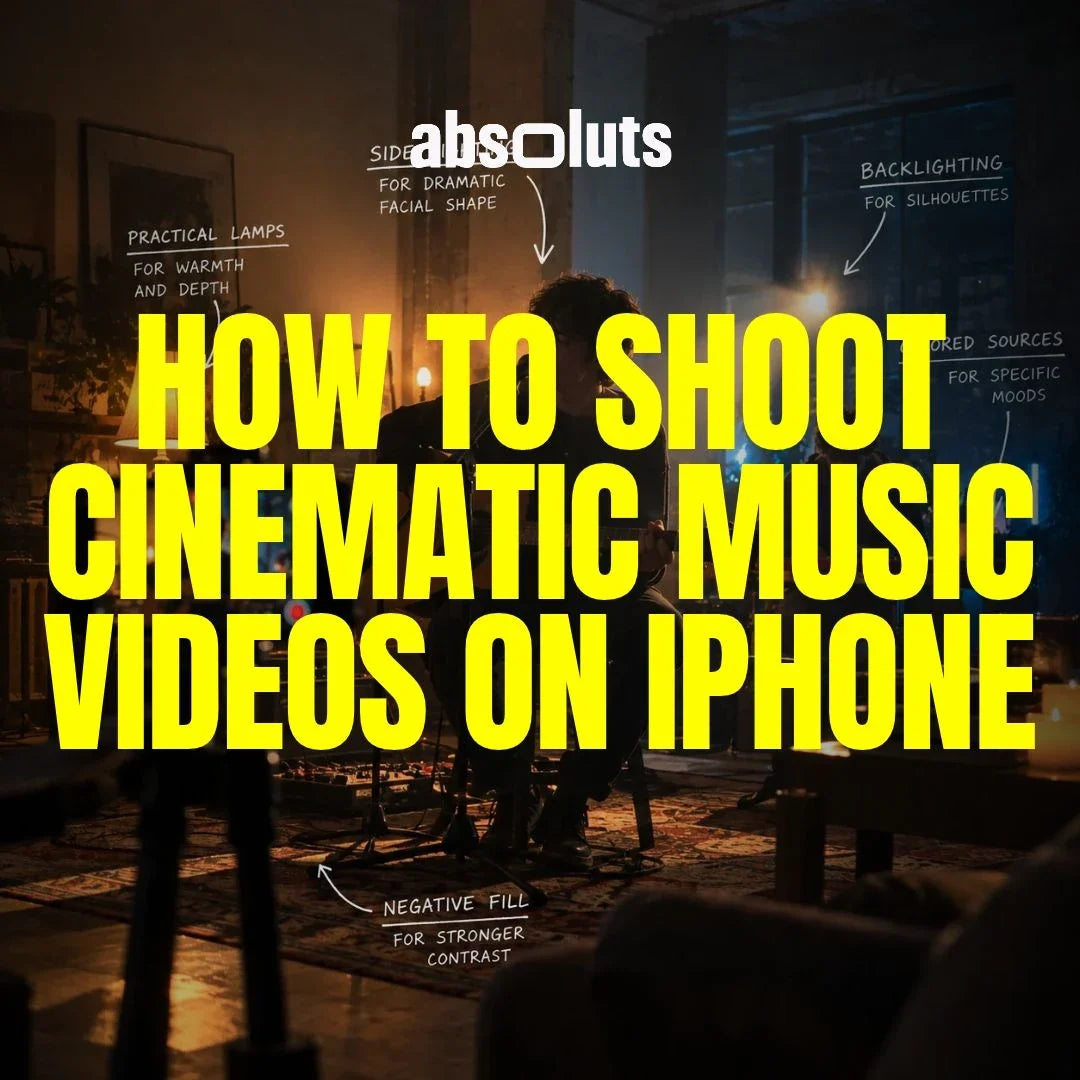
Lighting can define the atmosphere of an entire music video. You do not necessarily need multiple professional fixtures. A single directional source combined with practical lights can already create a compelling environment. Consider using:
- Side lighting for dramatic facial shape
- Backlighting for silhouettes
- Practical lamps for warmth and depth
- Colored sources for specific moods
- Negative fill for stronger contrast
Avoid adding random RGB lights simply to make the scene look cinematic. Every color should contribute to the visual concept. For example, warm light on the artist against a cooler background can create separation without requiring an elaborate setup.

6. Record Multiple Takes for Better Editing
One of the most important music video techniques is recording multiple performances of the same song. Play the track during filming so the artist can perform in sync with the original recording. Then capture several takes:
- Wide performance: Record the full song.
- Medium performance: Capture another complete take.
- Close-up performance: Focus on expressions and important lyrics.
- Creative angles: Record additional sections from different perspectives.
This gives you synchronized coverage that can be combined during editing. Try to use the same playback file and maintain consistent timing across takes.
For slow-motion lip-sync effects, additional planning is necessary. One common technique is to speed up the playback during recording and slow the footage to the intended speed afterward. The playback speed and recording frame rate must be calculated correctly for the desired result.
7. Choose the Right Apple Log Settings
When shooting a music video with Apple Log or Apple Log 2, consistency is particularly important. Multiple takes need to match visually. Whenever possible, lock:
- Exposure
- White balance
- Focus
- Frame rate
- Shutter speed
For footage intended to play at normal speed, 24, 25, or 30 fps can provide a natural cinematic motion cadence. Use higher frame rates when you specifically want slow motion.
If the artist needs to lip-sync, remember that footage recorded at a higher frame rate and slowed down will no longer match normal-speed playback unless you plan for it.
Also monitor exposure carefully, especially when working with dramatic lighting and deep shadows. Log footage provides grading flexibility, but severely underexposed areas can become noisy when lifted in post-production.
8. Create a Distinctive Look in Color Grading
Color grading is one of the most effective ways to establish a recognizable music video aesthetic. Start by matching exposure, white balance, and contrast across your performance takes. Then develop the creative direction.
For urban, commercial, and performance-focused Apple Log footage, iRED Mode LUT combines the Apple Log to Rec.709 transformation with a RED-inspired cinematic look.
For DaVinci Resolve workflows, Filmic Craft PowerGrade can provide additional control over film-inspired characteristics such as halation, glow, softness, grain, and chromatic imperfections.
These finishing tools can help reinforce the atmosphere created through lighting and production design. However, avoid treating every shot independently.
The performance footage, B-roll, and narrative scenes should feel like they belong to the same visual world. Consistency is what makes the finished video feel intentional.
Final Thoughts
A cinematic music video starts with a strong connection between sound and image. Listen to the song before planning the shoot. Build a simple visual concept, choose lighting that supports the atmosphere, and record enough performance coverage to create variety during editing.
Use camera movement intentionally and maintain consistent Apple Log settings across your takes. Then bring everything together through editing and color grading. You do not need multiple cameras, expensive locations, or a large production crew to create something memorable.
You need a clear visual direction and the discipline to make every shot support the music.


Leave a comment
All comments are moderated before being published.
This site is protected by hCaptcha and the hCaptcha Privacy Policy and Terms of Service apply.